Perform Mode
Perform mode is designed for a live operator. The interface is reduced to a single sequential list of cues so you can follow the show from top to bottom.
The cue list
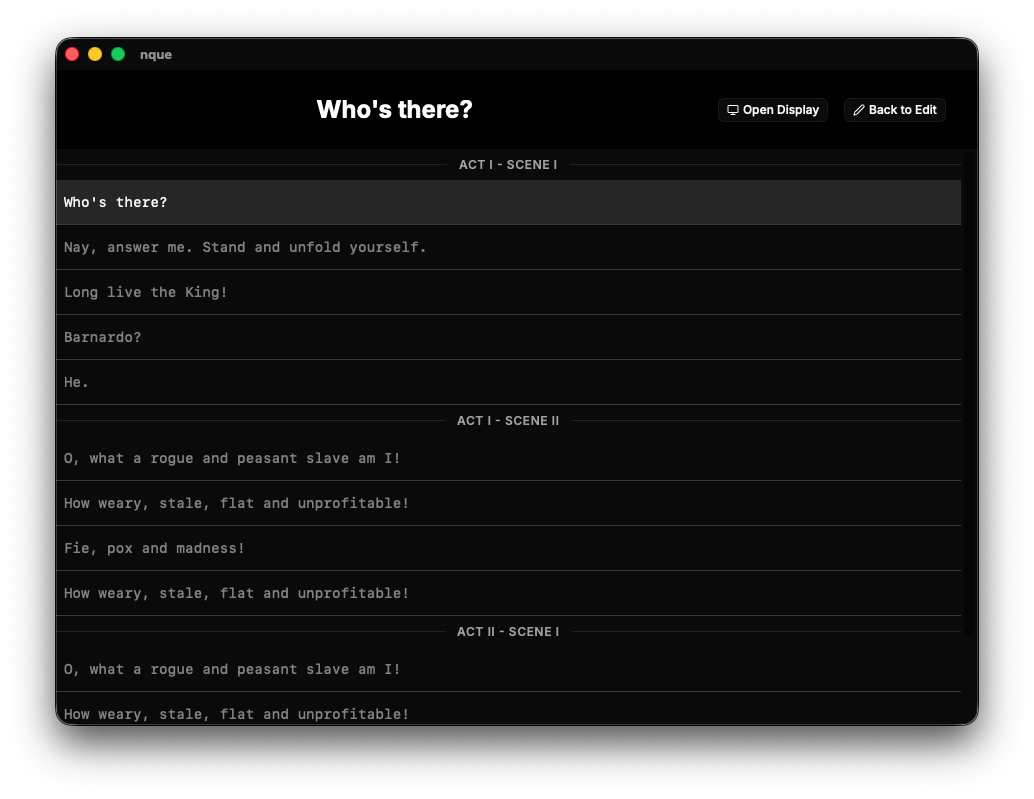
The hierarchical show is flattened into a linear sequence of items:
- Section dividers mark where each section with cues begins, labelled with
the full section path (for example
Act I - Scene i). - Cue rows list each cue in order.
Sections that contain no cues produce no divider. Child sections are expanded in place, so a nested scene appears after its parent's cues.
Highlighting and firing
At any moment one cue is highlighted and, after firing, another is active.
| Key | Action |
|---|---|
ArrowDown | Move the highlight to the next cue. |
ArrowUp | Move the highlight to the previous cue. |
Space | Fire the highlighted cue and advance the highlight. |
Escape | Exit perform mode and return to edit (resets cue state). |
The active cue is shown in large white text on the black toolbar band, and is broadcast to any open live display windows. When no cue is active the band is blank.
Firing a cue advances the highlight automatically, so a typical operator rhythm
is simply Space, Space, Space.
Entering and leaving
Switch to perform mode using the mode control at the top of the sidebar. Leave
via the Back to Edit button in the toolbar or by pressing Escape. Leaving
resets the highlight and active cue.
The show is read in perform mode. To change cue text, return to edit mode — the state is preserved, so you can fix a line and switch straight back.