Editing Shows
The show model
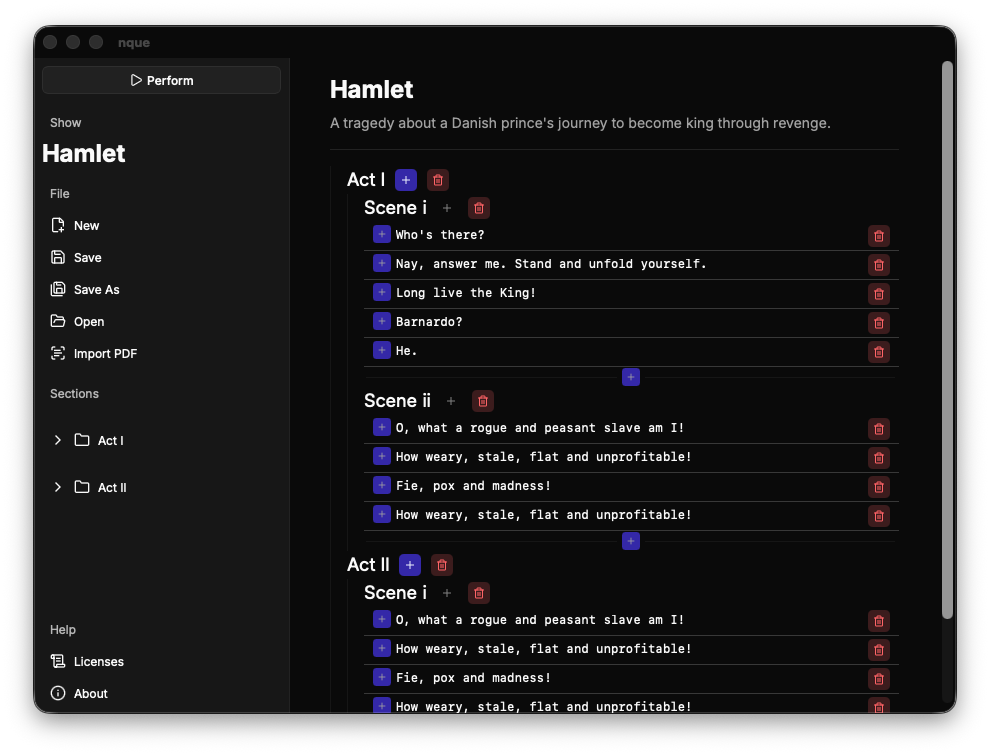 A show is a tree:
- A show has a title, a description, and a list of top-level sections.
- A section has a title, an ordered list of cues, and an ordered list of child sections (recursively).
A section is always either a leaf or a container:
- A leaf section holds cues and no child sections.
- A container section holds child sections and no cues.
This invariant keeps navigation and perform mode unambiguous. The editor enforces it: adding a child scene to a section that already has cues does nothing.
Inline editing
nque uses click-to-edit controls throughout. Click a value to turn it into an input, type the new value, and confirm. This applies to:
- The show title (sidebar).
- Each section title (sidebar tree and body).
- Each cue text (body).
Working with sections
Each section row offers:
- Rename — click the section title.
- Add scene — append a sibling section.
- Add child scene — nest a section under this one (containers only).
- Delete — remove the section and everything beneath it, after confirmation.
New top-level scenes are appended to the bottom of the show. New child scenes are appended to the bottom of their parent.
Working with cues
Each cue row offers:
- Edit text — click the cue.
- Add cue above / below — insert a new empty cue at the chosen position.
- Delete cue — remove it, after confirmation.
Insertion indices are clamped, so inserting past the end simply appends and inserting before the start prepends.
The show description
The show description is free-form text (for example, a plot summary). It is
shown in the show body and stored in the .nque file. PDF imports populate it
with a note about the source file.
Removing content safely
Deletions are destructive but guarded by a confirmation dialog. Because the show is a tree, deleting a container section also deletes all of its nested sections and cues. Save before making large structural changes if you want an easy rollback.